Buying a diesel diagnostic scanner is less about the brand and more about matching the tool to the trucks and workflows you actually service. A scanner that’s brilliant on paper can cost you hours in the bay if it lacks the right coverage, connectors or update cadence. Below are ten features that make a real difference in day‑to‑day diagnostics and repair for diesel vehicles.
1. Confirm vehicle and system coverage first
Start by matching scanner coverage to the vehicles you will diagnose. “Coverage” means both the truck makes/models and the systems supported (engine, ABS, transmission, body controllers, emissions systems). If you work fleets, ensure the scanner lists your manufacturers and model years; for mixed work, prioritize wide heavy‑duty compatibility. A specialist tool with perfect Cummins support won’t help if half your jobs are Mercedes or Volvo.
2. Bi-directional (active) controls and special functions
Bi‑directional control lets the tool send commands—open injectors, actuate EGR valves, initiate DPF regeneration, run component tests—so it’s indispensable for troubleshooting and repair verification. Look for named special functions (DPF regen, SCR dosing, injector cut‑in/out, idle relearn) rather than a vague “advanced functions” claim.
3. Live data, graphing and programmable data logging
Live PID streaming with customizable screens and graphing is more valuable than a long fault code list. Prefer tools that let you record sessions and export logs (CSV or PDF). Logged traces are often the difference between intermittent fault diagnosis and guesswork—useful for repeat or hard‑to‑capture failures.
4. Software updates, subscription model and update frequency
Check whether the scanner requires paid subscriptions for vehicles or updates, and how often updates are released. Fast OEM changes mean a tool that updates quarterly (or more) will remain useful longer. Also verify if updates are delivered over Wi‑Fi or require a PC and cable—Wi‑Fi updates save time for mobile techs.
5. Open ports, adapters and 12V/24V support
Diesel work frequently spans 12V light trucks and 24V heavy equipment. Confirm the scanner supports both voltages and includes or supports adapters for proprietary connectors (J1939, J1708, OEM plugs). A robust cable set and optional Nexiq/Nexiq‑style adapter compatibility expands usefulness across trailers, generators and construction equipment.
6. Physical durability and user interface ergonomics
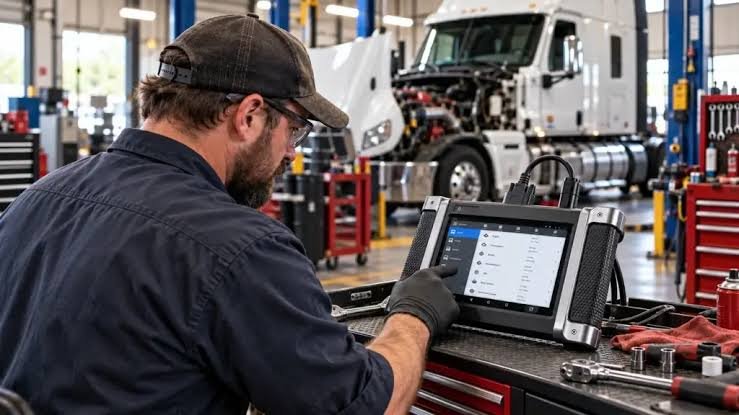
Rugged housing, impact‑resistant screen glass and a usable glove‑friendly interface matter in the shop or roadside. A bulky tablet with poor battery life or a tiny handheld with an unreadable screen will slow work. Inspect menu depth during demos—deep, nested menus add minutes per job; customizable home screens reduce friction.
7. Data management, reporting and vehicle history
Tools that store vehicle history, printable repair-ready reports and trouble‑code notes speed communication with fleet managers and owners. If you subcontract repairs or need warranty documentation, exportable reports are essential. Cloud sync between devices is a bonus for teams.
8. Diagnostic speed, processor and connectivity options
Diagnostic responsiveness depends on processor power and how the device connects to the vehicle. Fast Wi‑Fi, Bluetooth and direct USB options all have tradeoffs: Bluetooth is convenient but can be less reliable; tethered USB often offers the most stable connection. For busy shops, prioritize stable, fast connections so the tool spends time diagnosing, not reconnecting.
9. Training, technical support and community resources
Good vendor support—clear manuals, training videos, and responsive tech support—cuts downtime. Larger brands often have dealer networks and searchable knowledge bases. Also check for active user forums or local tech groups; peer tips often reveal vehicle‑specific quirks faster than official docs.
10. Cost structure and the right product fit for your workflow
Balance upfront cost against recurring fees and the scanner’s day‑to‑day utility. Mobile techs may prefer a rugged tablet with Wi‑Fi updates and cloud sync; small shops might choose an all‑in‑one handheld for basic diagnostics. If you need one solid, versatile option, consider a high‑coverage all‑in‑one that handles 12V/24V systems without constant accessory purchases.
Why this product? For mixed truck and light‑vehicle shops, an all‑in‑one tool with heavy duty support reduces the need for multiple units. If your work is focused on a specific OEM, check the dedicated scanners in the catalog or compare against the Launch and ANCEL models in our comparison guide for finer distinctions.
- List the exact makes/models and systems you service and confirm tool coverage for them.
- Verify bi‑directional functions and named special procedures you commonly use.
- Confirm 12V/24V support and availability of necessary vehicle adapters.
- Check update delivery method, cadence and any subscription fees.
- Test ergonomics, battery life and connectivity during a demo or trial.
Match the scanner to your fleet and workflow: coverage and active controls first, then durability, updates and data features. For most mixed shops, an updated all‑in‑one heavy‑duty compatible scanner is the most pragmatic purchase.
Do I need a different scanner for 24V trucks?
Not always—many heavy‑duty scanners support both 12V and 24V, but confirm voltage range and that the required adapters are included or available.
How important are software updates?
Very important. Regular updates add vehicle coverage and fix protocol bugs; verify frequency and whether updates cost extra.
Can a basic OBD2 scanner handle DPF issues?
Basic OBD2 tools will read codes but often can’t run forced DPF regens or view SCR dosing controls—look for named DPF and emissions functions.
Should I choose a tablet or handheld scanner?
Tablets offer better data visualization and reporting; handhelds are compact and cheaper. Choose based on how often you’ll record data and need to share reports.
Are third‑party adapters reliable?
Quality varies; choose adapters from reputable vendors and check compatibility lists. Cheap adapters can cause intermittent faults or communication errors.